
How to Build an AI Operating System Inside ChatGPT
Most businesses use ChatGPT as a writing assistant. They open a new conversation, write a long prompt, copy the response, and repeat the process the following day.
That approach can save time, but it does not create a scalable operating system.
A more advanced approach is to combine ChatGPT projects, custom instructions, skills, connected apps, memory, and automated workflows. Together, these components can turn ChatGPT into a practical AI operating system for your business.
At KONE.VC, I use this approach to analyze advertising performance, produce content, review sales conversations, create business documents, and automate recurring operational tasks.
What Is a ChatGPT AI Operating System?
A ChatGPT AI operating system is a collection of reusable instructions, specialized skills, business context, connected data, and automated workflows that help ChatGPT perform repeatable business tasks.
Instead of explaining the same task every time, you create a system that already understands:
- Your company
- Your preferred output format
- Your goals and priorities
- Your brand voice
- Your business processes
- The data sources it should use
- The criteria it should apply
- The actions it should recommend
The result is not simply a better chatbot. It is a reusable business system that helps you make decisions and complete work more consistently.
Why Traditional ChatGPT Prompting Is Not Enough
Prompts are useful for one-time tasks. They become inefficient when a task must be completed every day or every week.
For example, imagine that you want ChatGPT to review your Meta Ads performance. A traditional workflow might require you to repeatedly explain:
- Which metrics matter
- How performance should be evaluated
- What period should be compared
- What format the report should follow
- What recommendations should be included
- How aggressive or conservative the recommendations should be
Writing those instructions repeatedly wastes time and creates inconsistent results.
A reusable AI workflow solves this problem. The instructions, business context, evaluation criteria, and expected output are defined once. The system can then apply them each time the workflow runs.
The Four ChatGPT Workflows I Use in My Business
My AI operating system includes four especially valuable workflows:
- Daily advertising analysis
- Content production and repurposing
- Reusable business projects and instructions
- AI-assisted sales coaching
Each workflow solves a different operational problem.
1. Daily Meta Ads Analysis
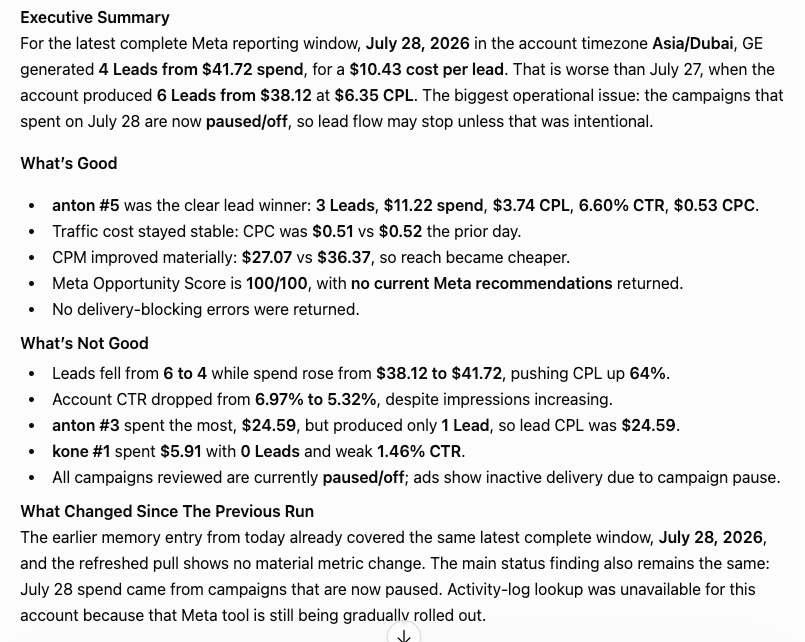
One of my most useful workflows reviews Meta Ads performance.
The system analyzes advertising data and produces an executive summary that explains:
- What is performing well
- What is underperforming
- What changed since the previous review
- Which campaigns or ad sets require attention
- What should be tested next
- Which actions should be prioritized
This is valuable because advertising performance rarely improves through one dramatic change. It usually improves through a series of small, informed decisions.
One meaningful improvement every day can create dozens of optimizations over a month.
What Should an AI Advertising Review Include?
A useful AI advertising review should include more than a list of metrics.
It should evaluate performance in context and answer questions such as:
- Did cost per result improve or decline?
- Did conversion volume change?
- Is frequency becoming too high?
- Are particular creatives losing effectiveness?
- Did budget changes improve efficiency?
- Are there unusual changes compared with the previous period?
- Which recommendation is most likely to produce a meaningful result?
The system should also distinguish observations from recommendations. This prevents raw data from being confused with a decision.
Example Output Structure
A recurring paid advertising report could use the following structure:
- Executive summary
- Positive developments
- Negative developments
- Changes since the previous run
- Risks and anomalies
- Recommended improvements
- Next actions
This structure makes the report useful for both an operator and an executive.
2. Content Creation Without Rewriting Long Prompts
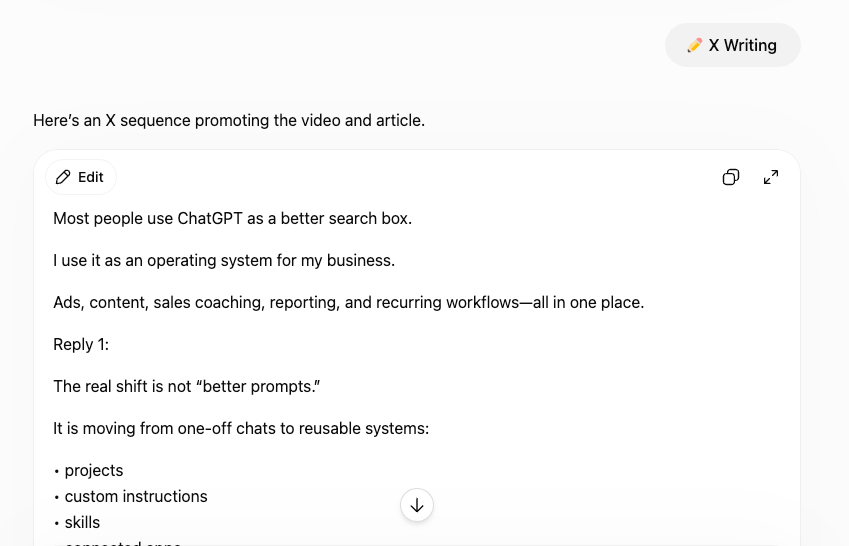
Another important part of my system is reusable content production.
I no longer want to write a detailed prompt every time I need an article, social media post, video description, business document, or campaign asset.
Instead, I use projects and specialized skills.
The project contains the permanent context. The skill contains the method for completing a particular task.
For example, I can provide a short request such as:
Create an article from this video.
The system can already understand:
- The intended audience
- The required language
- The preferred writing style
- The expected structure
- The SEO requirements
- The company positioning
- The desired call to action
This makes the interaction much faster.
What Are ChatGPT Skills?
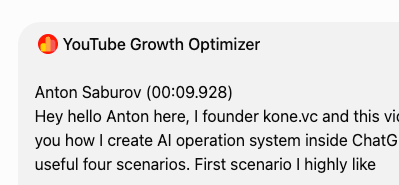
ChatGPT skills are specialized sets of instructions designed for a repeatable type of work.
A skill can be created for tasks such as:
- YouTube video optimization
- LinkedIn post writing
- X or Twitter content
- Meta Ads analysis
- Sales conversation reviews
- Email marketing
- SEO article creation
- Business audits
- Customer support
- Internal reporting
A well-designed skill does not simply tell ChatGPT to “write better.” It defines a clear process, quality standards, required inputs, output structure, limitations, and decision criteria.
How Skills Improve Content Production
A YouTube optimization skill, for example, can analyze a transcript and automatically produce:
- Title options
- A search-optimized description
- Video chapters
- Keywords
- Hashtags
- Thumbnail concepts
- A pinned comment
- Social media posts
- Strategic recommendations
The same video can then be repurposed for LinkedIn, X, Telegram, Threads, email, and a company blog.
One source asset becomes an entire content system.
3. Projects and Custom Instructions
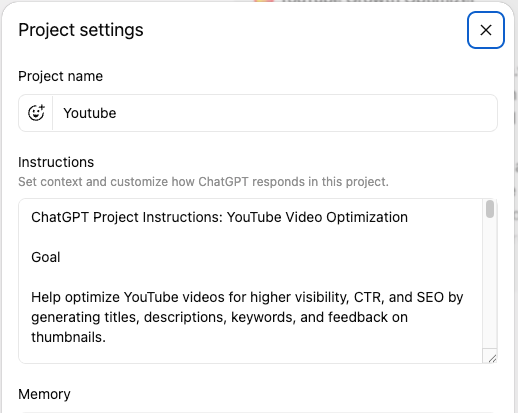
Projects provide the long-term context for a particular company, client, department, or workflow.
A project can contain:
- Company information
- Target audience definitions
- Brand positioning
- Tone of voice
- Product information
- Examples of previous work
- Standard operating procedures
- Formatting requirements
- Internal terminology
- Links to relevant resources
Custom instructions tell ChatGPT how to work inside that environment.
Together, projects and instructions reduce the need to repeatedly explain the same information.
What Should You Include in Project Instructions?
Strong project instructions should explain:
Role
Define what ChatGPT should act as.
Examples include:
- Marketing strategist
- Sales coach
- Paid advertising analyst
- Executive assistant
- Content editor
- Operations consultant
Objectives
Explain the outcomes the system should prioritize.
For example:
- Increase qualified leads
- Improve advertising efficiency
- Reduce manual reporting
- Produce consistent content
- Identify operational risks
- Improve sales performance
Inputs
Explain which information the system should expect.
This might include:
- Transcripts
- Advertising exports
- Meeting notes
- Customer interviews
- Business documents
- CRM data
- Website copy
Evaluation Criteria
Define how the system should judge the work.
A sales coach may evaluate discovery quality, objection handling, clarity, credibility, next-step control, and listening.
An advertising analyst may evaluate conversion volume, cost efficiency, tracking reliability, creative fatigue, audience saturation, and landing-page alignment.
Output Format
Specify the exact structure the system should return.
Consistent output makes AI-generated information easier to review, compare, and act on.
4. AI Sales Coaching
One of the most personally valuable workflows in my system is an AI sales coach.
After a conversation with a potential client, I provide the transcript to the system. The sales coach reviews the discussion and provides direct feedback.
The review can include:
- Overall score
- What went well
- What was unclear
- Missed opportunities
- Weak questions
- Objections that were not fully addressed
- Recommended improvements
- Better phrases to use
- Suggested next steps
The feedback is not always comfortable, but it is useful.
Improvement requires honest analysis. An AI sales coach can identify patterns that are difficult to notice during the conversation itself.
What Should an AI Sales Coach Evaluate?
A practical sales review should assess several areas.
Discovery
Did the salesperson understand the client’s real problem, urgency, constraints, and desired outcome?
Listening
Did the salesperson respond to what the prospect actually said, or simply move to the next prepared question?
Positioning
Was the service explained in a way that connected directly to the prospect’s needs?
Credibility
Were relevant examples, proof, expertise, or processes communicated clearly?
Objection Handling
Were concerns explored and resolved, or dismissed too quickly?
Next Steps
Did the conversation end with a clear commitment, deadline, owner, or follow-up action?
A repeatable scorecard makes it possible to compare several conversations and track progress over time.
How Workflow Agents Support Business Automation
Some business tasks need to run on a schedule rather than wait for a manual prompt.
Examples include:
- Reviewing advertising performance every morning
- Preparing a weekly executive report
- Summarizing new customer feedback
- Checking for changes in sales pipeline quality
- Reviewing content performance
- Identifying overdue tasks
- Monitoring recurring operational risks
A workflow agent can combine instructions, tools, data, and a schedule to complete a repeatable process.
The important point is not merely that the system runs automatically. It must also apply meaningful business judgment.
Automation without judgment can create more noise. A strong workflow should report only what matters and recommend a clear next action.
How to Build Your Own AI Operating System
You do not need to automate your entire company immediately.
Start with one task that is frequent, structured, and time-consuming.
Step 1: Choose a Repetitive Task
Good starting points include:
- Weekly reporting
- Content repurposing
- Sales-call reviews
- Advertising analysis
- Meeting summaries
- Customer feedback analysis
- Proposal creation
- Internal research
Choose a task that already has a recognizable process.
Step 2: Document the Current Process
Write down:
- What triggers the task
- What information is required
- Which decisions must be made
- Which mistakes commonly occur
- What the final output should contain
- Who uses the output
- What action happens next
This becomes the foundation of the AI workflow.
Step 3: Create Clear Instructions
Tell the system:
- Which role to perform
- Which goals to prioritize
- How to evaluate the input
- What not to assume
- Which format to use
- How to handle missing information
- When to flag uncertainty
- Which action to recommend
Clear instructions improve both consistency and safety.
Step 4: Add Business Context
Provide relevant context such as:
- Company documents
- Product descriptions
- Brand guidelines
- Customer profiles
- Previous reports
- Successful examples
- Internal processes
- Frequently used terminology
The more relevant the context, the less generic the output becomes.
Do not upload confidential information unless your company has approved the platform, permissions, and data-handling process.
Step 5: Test With Real Examples
Use several examples rather than one ideal case.
Test the system with:
- Complete data
- Incomplete data
- Poor performance
- Strong performance
- Ambiguous situations
- Contradictory information
- Unusual edge cases
The goal is to understand where the system performs well and where human review is still required.
Step 6: Improve the Workflow
After each run, ask:
- Was the analysis accurate?
- Was the output actionable?
- Did it miss important context?
- Did it produce unnecessary information?
- Were recommendations too generic?
- Did the format make decisions easier?
Update the instructions based on the answers.
Step 7: Automate Only After Validation
Do not automate an unreliable workflow.
First confirm that the system produces useful results when used manually. Then add a recurring schedule or connected workflow.
Human review should remain part of any process involving financial decisions, legal matters, sensitive customer information, or significant business risk.
What Business Functions Can Be Included?
An AI operating system can support many departments.
Marketing
- Campaign analysis
- Content creation
- SEO research
- Social media repurposing
- Lead-magnet development
- Email marketing
- Competitor monitoring
Sales
- Call analysis
- Lead qualification
- Follow-up preparation
- Proposal drafts
- Objection libraries
- Account research
- Pipeline summaries
Operations
- Meeting summaries
- Standard operating procedures
- Project updates
- Risk identification
- Internal reporting
- Process documentation
- Recurring task reviews
Executive Management
- Weekly briefings
- Decision summaries
- Department reports
- Opportunity analysis
- Business audits
- Priority tracking
- Strategic research
Customer Success
- Support-ticket analysis
- Customer sentiment summaries
- Renewal-risk identification
- Onboarding materials
- Frequently asked questions
- Customer feedback reports
What Are the Main Benefits?
The primary benefit is not simply faster writing.
A well-designed AI operating system can improve:
Consistency
The same standards and structure are applied across repeated tasks.
Speed
Teams spend less time preparing prompts, formatting reports, and repeating explanations.
Decision Quality
Information can be compared, categorized, and summarized more systematically.
Knowledge Reuse
Business context is preserved instead of being recreated in every conversation.
Employee Development
Systems such as sales coaches and review agents can provide frequent feedback.
Scalability
A proven process can be reused across employees, departments, or clients.
What Are the Main Risks?
An AI operating system still requires human oversight.
Potential risks include:
- Incorrect analysis
- Outdated information
- Missing context
- Overconfident recommendations
- Poor data quality
- Privacy problems
- Excessive automation
- Unclear accountability
- Employees following outputs without verification
AI should support judgment, not eliminate responsibility.
Every important workflow should clearly define:
- Who reviews the output
- Who approves the action
- Which data can be used
- Which decisions require human confirmation
- How errors are reported
- How the workflow is updated
Frequently Asked Questions
Can ChatGPT Really Become a Business Operating System?
ChatGPT can become part of a business operating system when it is connected to clear instructions, relevant context, repeatable workflows, and human review. It should not be treated as the only system responsible for the business. It works best as an intelligence and workflow layer supporting existing tools, data, and decision-makers.
What Is the Difference Between a Prompt and a Skill?
A prompt is usually an instruction for one conversation or task. A skill is a reusable process designed for a specific type of work. A skill can define required inputs, decision criteria, output structure, examples, limitations, and quality standards, producing more consistent results across repeated tasks.
Do I Need Coding Skills to Build AI Workflows?
Many basic workflows can be built without coding by using projects, instructions, files, connected apps, and automation features. More advanced workflows may require APIs, custom integrations, data pipelines, or developer support. The correct approach depends on the complexity, data sensitivity, and required actions.
Which AI Workflow Should a Business Build First?
Start with a frequent, measurable, low-risk task that already follows a clear process. Reporting, content repurposing, meeting summaries, advertising reviews, and sales-call analysis are often strong starting points because their outputs can be reviewed before any action is taken.
Can I Train a ChatGPT Skill on My Company Data?
You can provide approved company documents, examples, instructions, and other relevant context so the system can produce more tailored outputs. This is not necessarily the same as technically training a new AI model. Businesses should confirm data permissions, privacy requirements, retention settings, and security policies before sharing sensitive information.
Should AI Workflows Run Without Human Review?
Low-risk workflows may require only periodic review, but important recommendations and business actions should generally have a responsible human owner. Financial, legal, employment, security, and customer-impacting decisions should not be delegated to an AI system without appropriate review and controls.
Start With One Workflow
The biggest mistake is trying to create a complete AI transformation in one step.
Start with one painful, repetitive process.
Document it. Create instructions. Add relevant context. Test the workflow. Review the quality. Improve it. Only then should you automate it or expand it to another department.
A useful AI operating system is not created by collecting hundreds of prompts. It is created by turning proven business processes into reusable, measurable, and carefully supervised workflows.
To explore practical AI implementation resources, visit app.kone.vc.
For questions about implementing AI inside your company, contact anton@kone.vc.